
High CPM on Meta (Facebook and Instagram) feels scary because it makes every click and every conversion more expensive.
But CPM is not random. It is usually a result of the Meta ad auction: your bid, your estimated action rates, and your ad quality signals, compared to other advertisers fighting for the same people at the same time.
Also, important: a higher CPM is not always bad. Sometimes CPM goes up because you are buying a more valuable audience or a better placement. The real question is: is CPM going up while results are getting worse?
This post gives you 8 fixes you can do without creating new images or videos. You will mainly adjust delivery, targeting shape, placements, optimization, and quality signals.
What is CPM in Meta Ads and how to calculate it
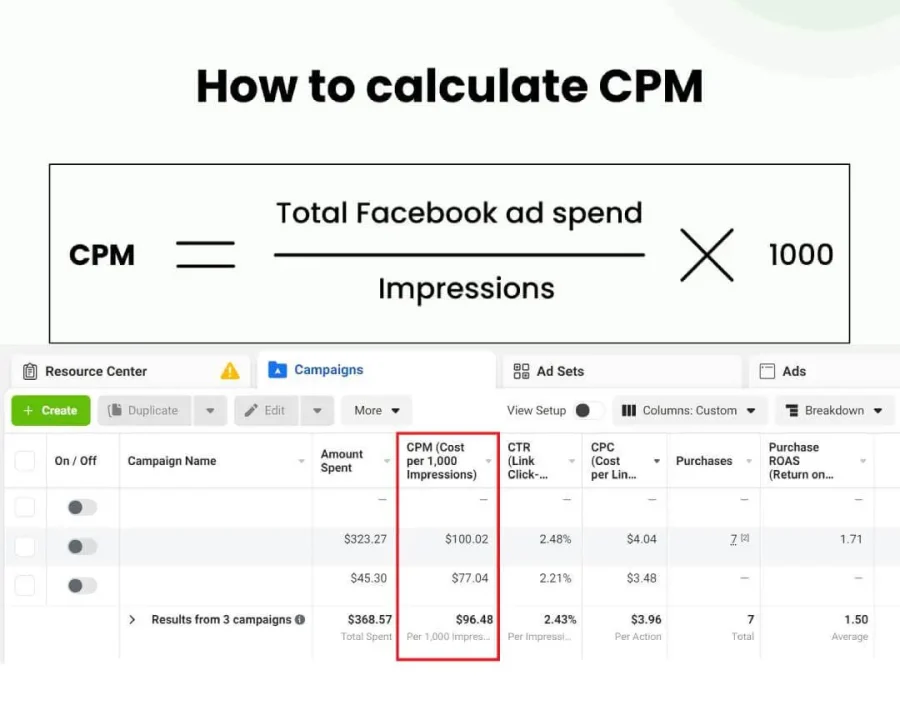
CPM means cost per 1,000 impressions on Meta.
A simple way to calculate it is:
CPM = (Amount spent ÷ Impressions) × 1,000
Impressions are how often your ads were on screen for your audience.
Useful Meta references (so you can validate the “why”)
- CPM (Cost per 1,000 Impressions)
- About Ad Auctions
- About ad quality
- How to Use Ad Relevance Diagnostics
- Significant edits and learning phase
First, do a 10-minute CPM diagnosis (so you don’t fix the wrong thing)
Before you touch settings, take one snapshot of your numbers.
Compare two equal time windows
Use last 7 days vs previous 7 days (or last 14 vs previous 14).
Track:
- CPM
- CPC (link click)
- CTR (link click)
- Frequency
- Cost per result (lead, purchase, etc.)
- Quality ranking, Engagement rate ranking, Conversion rate ranking
These diagnostics are part of Meta’s Ad Relevance Diagnostics, and Meta recommends using them to diagnose underperforming ads, not to chase the scores when you already meet your objective.
Use breakdowns to find the real source of high CPM
In Ads Manager, use Breakdown:
- Placement
- Platform (Facebook vs Instagram)
- Device
- Age
- Country/Region (if relevant)
Very often, your “high CPM problem” is really “one expensive placement” or “one tiny audience segment”.
After this quick check, pick the fixes below that match what you see.
Turn on Advantage+ placements (or stop over-restricting placements)
If you restrict placements too hard (example: only Instagram Feed, only Reels, only Stories), you force Meta to buy from a smaller pool of inventory. A smaller pool often means higher CPM.
What to do
- Go to the ad set level.
- Placements: select Advantage+ placements.
- If you must exclude placements, exclude only the ones that truly hurt results (based on your breakdown).
When this works best
- Your CPM is high, and you are running narrow placement selections.
- You want Meta to find cheaper delivery pockets across placements.
What to watch
- After a few days, re-check the breakdown by placement.
- If one placement gives cheap CPM but weak conversions, limit it later, but don’t start with heavy restrictions.
Reduce audience pressure by widening your targeting shape
High CPM often happens when too many advertisers are chasing the same small group. That is auction pressure.
You can lower CPM without new creatives by giving the system more room:
- Broader geo (if your business allows)
- Wider age range
- Fewer detailed targeting constraints
- Larger lookalikes (example: 5% instead of 1%)
This is not about being “less targeted”. It is about letting the system find cheaper pockets inside a bigger audience.
What to do
- If you are stacking many interests: remove the weakest half and keep only 1 or 2 strong signals.
- If you are using lookalikes: test a wider range (1% vs 3% vs 5%) in separate ad sets, but avoid creating many tiny ad sets.
- If you are using retargeting: expand the window (example: 7 days to 14 or 30) only if frequency is high and volume is low.
Quick rule
If frequency is climbing and CPM is climbing, your audience is usually too tight or over-served.
Stop resetting learning (batch edits and avoid constant tweaks)
When your ad set is in the learning phase, delivery is less stable. Meta also explains that only significant edits make an ad set re-enter the learning phase, and that edits can affect delivery even outside learning.
What to do
- If you have multiple changes, batch them into one edit, not many small edits across many days.
- Avoid changing these too often:
- Optimization event
- Audience
- Bid strategy
- Large budget jumps
Practical workflow
- Make changes on one day.
- Let it run for a stable window unless something is clearly broken.
- Review based on trend, not hourly feelings.
This reduces “random” CPM spikes because you stop forcing the system to re-learn.
Consolidate ad sets (too many splits can raise CPM)
If you split your budget into many similar ad sets, each ad set has less data, stays unstable longer, and can compete in overlapping auctions. This often keeps performance noisy and can push costs up.
What to do
- If you have multiple ad sets targeting almost the same people, merge them.
- A simple structure for many small to medium accounts:
- 1 to 2 prospecting ad sets
- 1 retargeting ad set
- 1 existing customer ad set only if you have enough volume
Simple check
If two ad sets have similar CPM, similar CTR, and similar results, but split the budget, you likely do not need both.
Improve quality signals without changing creatives (fix the mismatch)
Meta explains that higher-quality ads perform better in the auction, and lower-quality ads tend to cost more and may reduce distribution.
You can improve quality signals without new visuals by fixing experience mismatches.
Common mismatch examples
- The ad promises a clear benefit, but the landing page headline says something else.
- The ad promotes “free”, but the page pushes paid immediately.
- The age is slow, cluttered, or looks untrustworthy on mobile.
- The form is too long for a cold audience.
What to do
- Match your landing page headline to your ad’s first line (same promise, same topic).
- Reduce friction:
- Shorter form
- Clear pricing or clear next step
- Real trust signals (reviews, guarantees) only if honest
- Check mobile load and layout.
Even though CPM is an auction metric, the auction is influenced by estimated action rates and ad quality. A better experience helps those signals.
Watch frequency and fatigue, then adjust delivery
When frequency climbs, CPM often climbs after it. You are repeatedly buying impressions from the same people, and performance signals get worse.
What to do without new creatives
- If frequency is high in retargeting:
- Expand your retargeting window (7 to 14 to 30 days)
- Exclude recent converters (example: last 7 to 30 days) so you don’t waste impressions
- If frequency is high in prospecting:
- Broaden the audience (earlier section)
- Use Advantage+ placements (earlier section)
- Consolidate overlapping ad sets (earlier section)
Extra tip
If your account is small, don’t run heavy retargeting all the time. A tiny retargeting pool can get exhausted fast, and CPM becomes unrealistic.
Use the rankings as diagnostics (optimize the cause, not the score)
Meta is clear that ad relevance diagnostics are for diagnosing underperformance, not for optimizing ads that already meet your advertising objectives.
Still, these rankings are useful warning lights:
If the Quality ranking is below average
This can mean your ad is perceived as lower quality compared to ads competing for the same audience.
Focus on mismatch fixes (landing page promise, trust, clarity) and avoid “too good to be true” claims.
If the Engagement rate ranking is below average
This can mean your expected engagement is weaker than competitors for that audience.
Try slightly broader targeting, fewer restrictions, and check your first two lines of primary text for clarity. This is copy editing, not new creative assets.
If the Conversion rate ranking is below average
This can mean people who see your ad are less likely to convert compared to competitors with the same optimization goal.
Focus on landing page speed and friction, confirm tracking, and consider a higher-volume optimization event if your main event is too rare.
Improve your optimization signals (Pixel, Conversions API, and correct event choice)
When Meta has weak or messy signals, it struggles to find the right people. That can push CPM up because estimated action rates drop and you need to “pay more” to win auctions.
What to do
- Confirm your Pixel fires correctly for key events (ViewContent, Lead, Purchase).
- If possible, set up Conversions API so Meta receives more reliable server-side signals.
- Make sure your optimization event matches reality:
- If you get only a few purchases per week, optimizing for Purchase can be unstable.
- Temporarily optimize for a higher-volume event (Lead, AddToCart, InitiateCheckout), then move back to Purchase once volume improves.
Important
Do not change the optimization event every few days. Significant edits can cause re-entry into learning and affect delivery.
A practical order you can follow
If you want a clean process, do it like this:
- Break down CPM by placement and device.
- Use Advantage+ placements.
- Broaden targeting shape a bit.
- Consolidate overlapping ad sets.
- Stop constant edits and let delivery stabilize.
- If frequency is high, expand pool and add exclusions.
- Use the rankings to locate the weak signal.
- Improve tracking and event choice.
- Improve landing page match and reduce friction.
You do not need to do all 8. Most accounts improve with just 2 or 3 correct changes.
Conclusion
High Meta CPM is usually not a creative problem. It is often an auction pressure problem, a delivery restriction problem, or a weak-signal problem.
Start by finding where the CPM is coming from (placements, audience segments, devices). Then fix the biggest levers first: placements, audience shape, learning stability, and consolidation. Use Ad Relevance Diagnostics as a diagnostic tool, and keep your focus on the real business result.