

Blogging is not dead in 2026, but “just publish” is not enough anymore. There is AI content everywhere, social feeds move fast, and most people have zero patience for long, vague posts. The blogs that still grow are the ones that are clear, honest, and genuinely useful.
In this guide, I am focusing on practical blogging tips you can apply even if you have limited time. You will learn how to pick the right topics, write posts people actually read, and build a simple system that improves over time (instead of burning out after a few weeks).
1. Start with a clear reason and niche
Before you write your first post, be very clear about:
- Why are you blogging?
Examples: get clients, build a personal brand, earn ad or affiliate income, or support a product. - Who are you writing for?
Example: “freelance web developers in small cities” is better than “everyone who likes tech”. - What problem will you help them with?
Example: “help freelancers get better clients and stable income”.
When your “why”, “who”, and “problem” are clear, every other decision becomes easier:
- Topics are easier to choose.
- Titles are easier to write.
- It is easier to say “no” to random ideas.
2. Choose 3–5 content pillars (main topics)
Do not write about everything. Pick 3–5 content pillars that match your niche and your goals.
For example, a “blogging tips” site could have:
- Content Strategy – how to plan posts, find ideas.
- Writing and Editing – how to write clearly and fast.
- SEO and Traffic – keywords, on-page SEO, link building.
- Monetization – ads, affiliates, products.
- Tools and Workflows – software, templates, systems.
Every time you think of a new post, check:
Does this fit into one of my pillars?
If not, maybe it is not for this blog.
3. Understand search intent before you write
For every post, ask:
- What is the main question the reader has?
- What type of answer are they expecting?
Some simple intent types:
- Learn something – “what is pillar content”
- Do something – “how to start a blog on WordPress”
- Compare options – “WordPress vs Ghost for blogging”
- Choose or buy – “best hosting for beginners”
Your post should match the intent:
- For “what is…” → definitions, examples, diagrams.
- For “how to…” → step-by-step instructions, screenshots.
- For “best…” → comparisons, pros and cons, real recommendations.
If the intent is “how to”, but you only give theory, the post will not feel helpful.
4. Plan posts with simple outlines
High-quality posts often start with a good outline.
You can use a simple outline structure:
- Short intro (set the problem).
- What the reader will get from this post.
- Main sections (3–7 clear steps or tips).
- Short summary and next step.
For example, this blog post outline includes an introduction, then 20 blogging tips.
Spend 5–10 minutes on the outline. It saves time later and keeps the article focused.
5. Write for humans first, but respect SEO basics
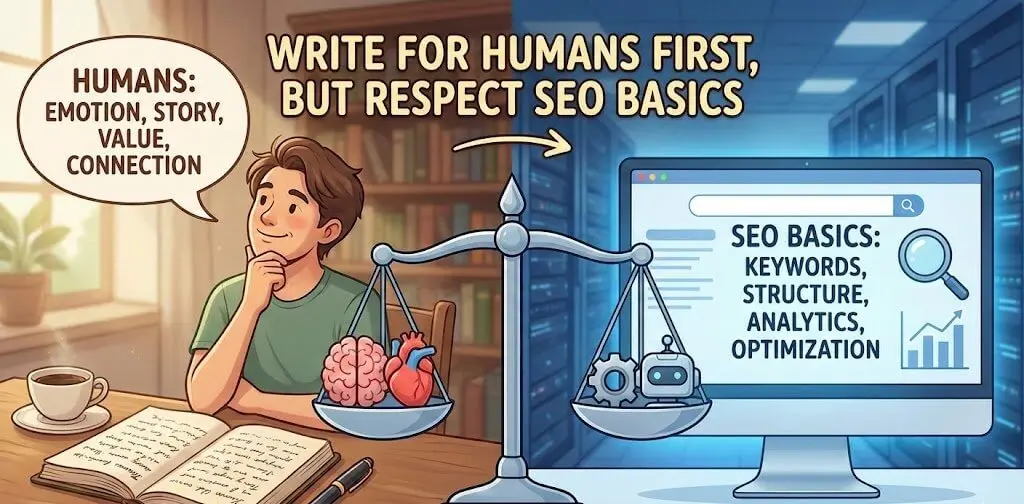
You do not need tricky SEO hacks. You need clear structure and simple language.
Basic on-page checklist:
- One main H1 with the main topic (this is usually the title).
- Use H2 and H3 headings to break the post into clear sections.
- Mention the main keyword naturally in:
- Title
- First 100–150 words
- At least one H2
- URL slug (short and clean:
/blogging-tips/)
Write like you are talking to a smart friend:
- Short sentences.
- Simple words.
- Explain jargon when you use it.
- Avoid filler like “in today’s fast-paced digital world…”.
Search engines are better now at understanding natural language. If humans like the content and stay on the page, that is a strong signal.
6. Add real experience and examples
This is one of the biggest differences between average and high-quality content.
Instead of only saying:
“Post consistently.”
You can say:
“I publish one in-depth guide every two weeks. When I did this for six months, my organic traffic went from X to Y. The main change was consistency, not posting every day.”
Try to add:
- A small story from your own blog.
- A screenshot (analytics, email list, search console).
- A real example: title, CTA, email, or content upgrade that worked.
You do not need to share all your private numbers. But real examples show that the advice comes from practice, not theory.
7. Use a simple keyword strategy (topics, not only words)
You do not need to be an SEO expert to pick topics that can rank.
Basic process:
- Write down your main topics (content pillars).
- For each topic, think of questions your audience asks.
- Use a simple keyword tool or even Google auto-suggest to see how people search those questions.
- Group similar searches into one article.
Example for “blogging tips”:
- “blogging tips for beginners”
- “how to start a blog in 2026”
- “how often should I post on my blog”
- “how long should blog posts be”
Maybe you write:
- One big guide: “Blogging Tips for Beginners in 2026”
- One focused post: “How Often Should You Post on Your Blog?”
Do not stuff all keywords in one article. It is better to have one clear main topic per post.
8. Make posts easy to scan
Most people scan first, read later.
Make scanning easy:
- Use clear headings.
- Use bullet points and numbered lists.
- Use bold text for important phrases (but not too much).
- Add small summary boxes like “Key Takeaways” or “In short”.
- Use short paragraphs (2–4 lines).
A good test:
- Open your post on mobile.
- Scroll from top to bottom in 5–10 seconds.
- Can you understand the main points without reading every word?
If yes, you are on the right track.
9. Internal links: help readers go deeper
Internal links are powerful for SEO and user experience.
Use them to:
- Explain related concepts in more detail (link to your older posts).
- Show next steps: “If you are ready to monetize, read this next…”
- Build topic clusters around your main pillars.
Simple rules:
- Add 3–10 internal links in each article (depends on length).
- Use descriptive anchor text (not “click here”).
- Link both up (to bigger guides) and down (to more specific posts).
Over time, this builds a strong structure for your blog. It also helps search engines understand what your site is about.
10. Add a strong call to action (CTA) on every post
Every post should answer:
“What should the reader do next?”
Examples:
- Join your email list.
- Download a free template or checklist.
- Read another related article.
- Share the post.
- Contact you for a service.
Place CTAs:
- In the middle of the article (soft CTA).
- At the end (main CTA).
- In the sidebar or a sticky section (if it fits your design).
A simple email CTA example:
“Want more practical blogging tips? Join my weekly email where I share one real experiment and what I learned from it.”
11. Build an email list from day one
Social networks and search algorithms can change. Your email list is more stable.
Basic steps:
- Choose an email tool.
- Create one lead magnet:
- A short PDF (checklist, template, mini-guide), or
- A 5-day email course.
- Add opt-in forms:
- After posts.
- In the sidebar or footer.
- As a simple in-page box, not only popups.
Use your list to:
- Share new posts.
- Test ideas.
- Ask readers what they want next.
- Build trust before you sell anything.
12. Promote your posts like a product launch
“Publish and wait” almost never works now.
Simple promotion checklist for each new post:
- Share it on your social profiles with custom text, not just the link.
- Post a short summary in relevant communities with a link to the full article.
- Send it to your email list.
- Turn key points into:
- 2–3 tweets or threads
- One short video, if you are comfortable
- Reach out to:
- People you mentioned in the post
- Bloggers who have related content (suggest your post as a useful resource, but do not spam)
Focus on one or two main platforms where your audience actually spends time. It is better to do a few channels well than many channels badly.
13. Update old posts instead of only writing new ones
Search engines like fresh and accurate content.
Every few months:
- Check which posts get traffic.
- For the top posts:
- Update outdated info.
- Add better examples.
- Improve headings and structure.
- Add internal links to your newer posts.
- Update the “last updated” date on the page (if you show it).
Sometimes updating one good post gives more traffic than writing five new ones.
14. Make your site fast and clean
You do not need a perfect technical setup, but you should avoid obvious problems.
Key points:
- Choose reliable hosting.
- Use a light theme and avoid too many heavy plugins.
- Compress images before uploading.
- Use caching.
- Avoid annoying popups that cover the whole page, especially on mobile.
Test your site:
- Open it on your phone with mobile data.
- If it feels slow or messy, readers will leave quickly.
Good UX helps your content look higher quality in both user eyes and search engine metrics.
15. Use analytics, but do not obsess daily
You need some data, but not too much.
At a minimum:
- Set up Google Analytics 4 or a similar tool.
- Set up Google Search Console.
Check once a week or once every two weeks:
- Which posts get the most traffic.
- Which search terms bring people to your site.
- Which posts have high impressions but low clicks.
Use this information to:
- Improve titles and intros.
- Decide what to write next.
- Decide which posts deserve an update.
16. Use AI as an assistant, not as a replacement

AI tools can help a lot, but there is risk if you copy them blindly.
Good ways to use AI:
- Brainstorming topic ideas.
- Turning bullet outlines into first drafts.
- Rewriting sections to make them clearer.
- Checking grammar.
- Creating simple tables or lists.
But you should:
- Decide the angle and structure.
- Add your examples and stories.
- Edit for your voice.
- Check facts.
If your entire post looks like something any AI could generate in one click, it will be hard to stand out or be seen as high quality.
17. Be consistent, but pick a realistic schedule
You do not need to post daily.
Choose a schedule that you can follow for at least 6–12 months. For example:
- One in-depth article every week, or
- Two shorter articles per week, or
- Two big guides per month.
Consistency matters because:
- You become a better writer.
- Search engines see regular activity.
- Readers learn to expect new content.
If you miss a week, do not quit. Just start again. Long-term bloggers win, not perfect ones.
18. Common mistakes to avoid
A few things that often hurt blogging quality:
- Writing only for search engines
Over-optimized text, keyword stuffing, fake-sounding language. - No clear audience
Posts on random topics that do not connect. - No next step for the reader
No CTA, no internal links, no reason to stay. - Ignoring old content
Posts from years ago with wrong or outdated info. - Copying other blogs too closely
Same headlines, same structure, same tips.
Add your own voice and examples.
19. Final thoughts: focus on trust and usefulness
High-quality blogging in 2026 is not about tricks.
It is about:
- Helping a clear type of reader solve real problems.
- Sharing experience, not only theory.
- Writing in a simple, honest way.
- Updating and improving what you already have.
- Building a direct relationship with your audience.
If you follow the tips in this article and apply them steadily over time, your blog will not only look better in search engines’ eyes. It will actually help people, which is the real long-term ranking factor.
20. Turn real questions into your content engine
If you want steady traffic and better content ideas, stop guessing topics. Build your next posts from real questions people already ask.
Simple ways to collect questions:
- Google Search Console: export queries for the last 28 days, filter “impressions > 0”, and look for questions you do not fully answer yet.
- Comments + emails + DMs: copy questions into one note (Notion/Docs/Sheet).
- Your own site search (if you have it): the search terms are pure content ideas.
- Competitor research (smart version): check their comments and “People also ask”, then write the clearer, more practical version with your own examples.
How to use this weekly (30–45 minutes):
- Pick 5 questions.
- Group them into one theme (one post).
- Write the post as “question → answer → example → next step”.
- Add a short FAQ section at the end with the extra questions (great for readers and SEO).
This keeps your blog focused, makes writing easier, and helps you publish content that already matches search intent and real reader needs.