
A landing page is not just a page with a form. It is a focused page built for one job: move a visitor to one next step. If you are serious about leads, signups, demos, sales, or even email subscribers, landing pages are one of the fastest ways to improve results without rebuilding your full website.
In this complete guide, I will cover how to plan a landing page, write the copy, design it for conversions, handle SEO the right way, and run tests that actually teach you something.
What a landing page is (and what it is not)

A landing page is a single-purpose page. It is usually connected to an ad, an email campaign, a social post, or a specific keyword.
A landing page is not:
- Your homepage
- A generic services page with 10 different CTAs
- A blog post (even if it has a CTA)
- A “nice design” page with unclear messaging
The real difference: intent and focus
A good landing page has:
- One main audience
- One main problem
- One main promise
- One main action
When you try to serve everyone, you serve no one. Landing pages win by being narrow and clear.
When you should use a landing page
Use a landing page when you want control over the message, the flow, and the conversion action.
Typical cases:
- Paid ads (Google Ads, Meta Ads, LinkedIn Ads)
- A high-intent keyword you want to convert
- A product launch or feature launch
- A webinar, workshop, or lead magnet
- A waitlist or early access signup
- A “book a call” funnel for services
Landing page strategy: the 7 decisions that matter most
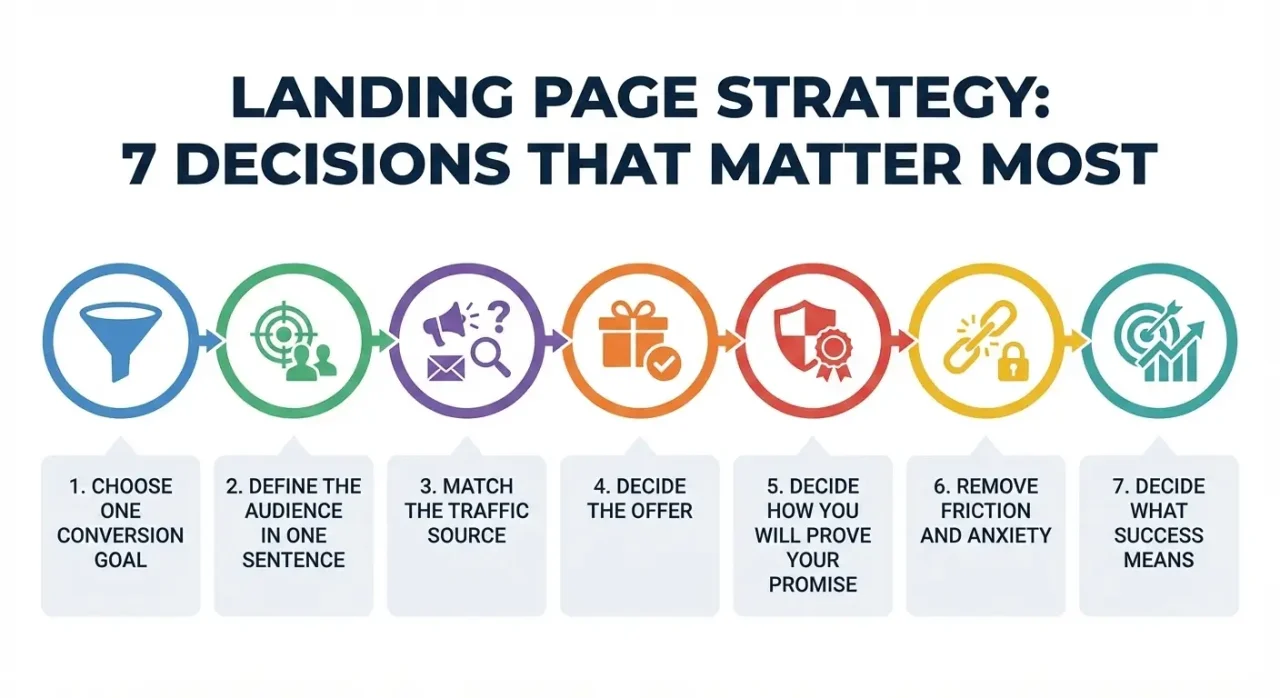
Most landing pages fail before design starts. They fail because the strategy is weak.
Here are the 7 decisions I make first.
1) Choose one conversion goal
Pick one primary goal:
- Start free trial
- Request demo
- Book a call
- Buy now
- Download
- Subscribe
Then make everything support that goal. If you want secondary actions (like “read docs”), keep them visually smaller and lower on the page.
2) Define the audience in one sentence
Bad: “Small businesses.”
Good: “Solo founders building a SaaS MVP who need a fast landing page system without hiring a designer.”
This one sentence will guide your copy, examples, and CTA wording.
3) Match the traffic source
A landing page is part of a chain:
- Ad promise → landing page headline
- Email topic → landing page opening
- Keyword intent → landing page content
This is often called message match. If your ad says “Bookkeeping for Shopify stores” but your landing page headline says “Accounting for modern businesses”, you just created doubt. Doubt kills conversions.
4) Decide the offer (and make it specific)
A landing page offer is not just “our product”. It is the value in a tight package, like:
- “Get a 14-day trial and launch your first campaign today”
- “Book a 20-minute audit call and leave with a clear action plan”
- “Download the checklist and fix your technical SEO in 30 minutes”
If the offer is vague, your page will feel like marketing noise.
5) Decide how you will prove your promise
You need proof. Pick 2 to 4 strong proof types:
- Case study results
- Screenshots or product UI
- Testimonials with names and roles
- Logos of customers (only if real)
- Before/after examples
- Data, benchmarks, or external references
- Clear process steps (for services)
For research-backed UX principles and why clarity beats cleverness, Nielsen Norman Group is a strong reference.
6) Remove friction and remove anxiety
These are different:
- Friction is effort: too many fields, slow page, confusing layout.
- Anxiety is fear: “Will this work for me?”, “Is my data safe?”, “Am I wasting money?”
A strong landing page reduces both. Reduce friction with fewer fields, clearer layout, and faster load. Reduce anxiety with privacy notes, clear pricing, guarantees, and strong social proof.
7) Decide what “success” means before you publish
Do not publish and hope. Define:
- Conversion event (what counts)
- Conversion rate target (a starting goal)
- Secondary metrics (scroll depth, click rate on CTA, form starts)
- Time window (7 days, 14 days, 30 days)
Landing page structure that works in most niches

There is no perfect template, but there is a proven flow.
Section 1: Above the fold (headline, subheadline, CTA)
This is the first “yes or no” moment. A strong headline usually does one of these:
- Clear outcome: “Launch your landing page in 30 minutes.”
- Clear problem solved: “Stop losing leads due to slow, messy forms.”
- Clear audience: “Landing pages for B2B SaaS that need more demos”
A strong subheadline adds clarity: who it is for, what is included, and what makes it different.
CTA button text should be specific:
- “Get the checklist.”
- “Start free trial”
- “Book a demo.”
- “See pricing”
Avoid generic CTAs like “Submit” or “Learn more” unless that is truly the only action.
Section 2: Benefits (not features)
Benefits answer: “Why should I care?” A simple method is feature → advantage → benefit.
Example:
- Feature: “Auto-generated reports.”
- Advantage: “No manual spreadsheets”
- Benefit: “Know what is working in minutes”
Aim for 3 to 6 benefits, not 20.
Section 3: Proof
Proof can be:
- 2 to 4 testimonials
- One short case study block
- Metrics (only if real)
- “As seen in” (only if true)
If you do not have proof yet, use demonstration: show the product, show sample output, show the process, and deliverables clearly.
Section 4: How it works (simple steps)
This reduces anxiety. Keep it short as below example:
- Enter your website URL
- The tool scans your landing page for speed, clarity, and SEO issues
- You get a prioritized checklist of fixes you can apply in under 30 minutes
For services:
- Book a call
- I review your site and data
- You get a plan and fixes
Section 5: Objections and FAQ
FAQ is not filler. It is a conversion section. Use it to remove anxiety and reduce support questions.
Section 6: Final CTA
Repeat the CTA with a slightly different angle: “Ready to launch?”, “Want the same result?”, “Get your plan today”.
Copywriting: How to write landing page text that converts
If you want one rule: clarity beats cleverness.
Start with the problem your visitor already feels
Your visitor is thinking:
- “Will this solve my exact problem?”
- “Is this for someone like me?”
- “Can I trust this?”
- “How hard is it?”
Your opening should answer these quickly.
Use the “so what?” test
Every sentence must earn its place. If a sentence says “Our platform is innovative,” ask: so what?
Better: “Build and publish a landing page without waiting for a designer.”
Write like you talk, but keep it tight
Simple English does not mean “too casual”. It means short sentences, concrete words, fewer adjectives, and more specifics.
Use a value proposition that is actually testable
Weak: “All-in-one solution for growth.”
Strong: “Create, test, and track landing pages without code.”
Now you can test it against alternatives.
Build a stronger offer with risk reversal
Visitors fear regret. Risk reversal reduces anxiety:
- Free trial
- Cancel anytime
- Money-back guarantee
- “No credit card”
- Transparent pricing
- Clear expectations
Do not hide limitations. If you do, support tickets will punish you later.
Make your CTA match the commitment level
If your CTA is “Buy now”, your page must do a lot of work. If you are early stage, consider micro-commitments:
- Download
- Quiz
- “Get a free estimate”
- “See a sample”
- “Watch a 2-minute demo”
Micro-commitments often lift conversion rate because the visitor is not forced into a big decision.
Form copy: fewer fields, better quality
A form is a trade. Visitor gives info, you give value.
Tips:
- Ask only what you truly need
- If you need more fields, explain why
- Use helpful labels and examples
- Show what happens next after submit
Common pattern:
- Email + first name is enough for a lead magnet
- Name + email + company + role is common for B2B demo
- Phone number should be optional unless you truly need it
Design and UX: Make it easy to understand and easy to act
Design is not decoration. Design is how fast the visitor understands.
Prioritize readability
- Use one main column for content
- Keep line length comfortable
- Use clear headings
- Use real spacing (do not cram everything)
One primary CTA, repeated logically
A long landing page can repeat the same CTA multiple times. That is fine. But it must still feel like one story, not a page screaming “BUY” every 10 seconds.
Use visual hierarchy
Make it obvious:
- What is the page about?
- What is the next action?
- What should I read first?
This is often about headline size, contrast for CTA button, section spacing, and short bullet lists.
Make the mobile version feel designed, not “shrunk”
Check:
- Button size and spacing
- Form usability
- Sticky CTA (sometimes helpful, sometimes annoying)
- Page speed on mobile data
Speed matters, because patience is limited
If your landing page is slow, people bounce before they even read your headline.
If you want a strong starting point for performance and user experience signals, read about Core Web Vitals.
Landing page SEO: How to rank and still convert
Not all landing pages should rank. Some should convert only. So the first SEO question is:
Should this landing page be indexed?
Indexable pages are good for:
- Long-term organic traffic
- High-intent keywords
- Product and feature pages
- Evergreen “money pages” you want to rank
Non-indexed pages are better for:
- Short-term ad campaigns
- Seasonal promos
- Pages with thin content or very similar variants
- A/B test variants you do not want indexed
If you do not want a page in Google, use noindex the right way using Google’s robots meta directives documentation.
Avoid the thin landing page SEO trap
Many landing pages are just headline, a few bullets, and a form. That can convert from ads, but it often will not rank well for competitive keywords.
If you want SEO traffic, add real depth:
- Clear definitions and audience fit
- Use cases and scenarios
- Comparisons and alternatives
- FAQs that match real searches
- Proof and examples
- Internal links to supporting content
Handle duplicates and variants carefully
If you create many similar landing pages, Google may treat them as duplicates.
Basic rules:
- Do not publish 30 near-identical pages for small keyword changes
- If you must, create one strong “main” page and support it with sections
- Use canonical correctly when needed using Google’s canonical guidance
Use internal linking like a smart map
Landing pages should not be isolated.
If a landing page is indexable, link to it from:
- Relevant blog posts
- Relevant category pages
- Product navigation (if it fits)
Also link out from the landing page to:
- A detailed guide (your blog)
- Case studies
- Docs (if product)
- Pricing (if decision-stage)
This helps users and helps search engines understand the page.
On-page SEO basics that still matter
For an indexable landing page:
- One clear primary keyword for the page
- Title tag that matches intent
- Meta description that sells the click honestly
- H1 that matches the page promise
- Clean URL
- Fast load
- No intrusive popups (especially on mobile)
Google’s baseline guidance is worth reading at least once: Google Search Essentials.
Testing: How to run A/B tests that do not waste time
Most A/B testing fails because people test random ideas. I use a simple approach.
Step 1: Start with a hypothesis, not a guess
Bad: “Let’s try a new hero.”
Good: “If I make the headline more specific to the ad promise, more visitors will understand the offer, so CTA clicks will increase.”
Step 2: Test high-impact areas first
In order, the biggest levers are often:
- Headline and subheadline
- Offer and CTA wording
- Proof section
- Form friction and form layout
- Page speed and mobile usability
- Page structure and flow
Step 3: Measure the right thing
Do not measure only final conversions. Track CTA click rate, form start rate, form completion rate, scroll depth, and (carefully) time on page.
Sometimes a variant increases clicks but reduces lead quality. If possible, connect leads to outcomes.
Step 4: Keep tests clean
- Test one major change at a time
- Run long enough to cover weekdays and weekends
- Do not stop early just because you see a spike
Tracking and analytics: What to set up before you spend money on traffic
If you run paid traffic without tracking, you are buying surprises.
Minimum tracking setup
- Pageview tracking (GA4 or similar)
- Conversion event for the main action
- CTA click event
- Form submit event
- Thank you page view event (if you have one)
If you need GA4 reference docs, use Google Analytics Help.
Make your thank you page useful
A thank you page is often a missed opportunity. Use it to confirm what happens next, set expectations, offer an optional next step, and reduce support questions.
Real-world landing page patterns (that you can copy safely)
These are patterns, not templates.
Pattern 1: The problem-aware page
Best for people searching with pain.
Flow: problem statement → why common solutions fail → your approach → proof → CTA
Pattern 2: The product-aware page
Best for branded searches and feature searches.
Flow: outcome headline → product UI and benefits → how it works → pricing or demo CTA → FAQ
Pattern 3: The comparison page
Best for “X vs Y” keywords.
Flow: honest comparison table → who each option is best for → switching costs → proof → CTA
Be fair. If you write fake comparisons, readers will feel it.
Pattern 4: The service landing page
Best for agencies and freelancers.
Flow: what I do (specific) → who it is for → examples → process and timeline → CTA to book call
A service page converts better when it feels like an invitation to a real conversation, not a hard sales pitch.
Common landing page mistakes I see again and again
Mistake 1: The headline is clever but unclear: If a visitor cannot explain your offer in 5 seconds, you are losing leads.
Mistake 2: Too many CTAs: One page should have one main job. Extra CTAs create confusion and reduce conversions.
Mistake 3: No proof: Even one strong testimonial or one clear example often beats long paragraphs of claims.
Mistake 4: Features with no benefits: If you list features, always explain what changes for the visitor after they use them.
Mistake 5: Forms ask for too much: Every extra field is a tax. If you need more fields, earn it with proof and a high-value offer.
Mistake 6: The page is indexed when it should not be: Promo variants, test variants, and thin pages can create SEO mess and cannibalization.
Mistake 7: The page looks fine but loads slowly: Speed affects bounce rate, trust, and conversion rate.
Advanced SEO and content depth for high-competition landing page keywords
If you are targeting high competition keywords around “landing page”, you need to win on depth, clarity, and usefulness, not just “best practices”.
Here are the upgrades I recommend.
1) Build one strong pillar page and support it with clusters
Instead of publishing many similar landing pages, build one strong “complete guide” page (this post) and support it with deeper posts like:
- Landing page copywriting frameworks
- Landing page SEO and indexing rules
- Landing page examples by industry
- Landing page checklist and teardown process
- Landing page A/B testing playbook
Then use internal links to connect them.
This reduces keyword cannibalization and makes the site feel more authoritative.
2) Cover search intent layers, not just definitions
High-competition keywords usually include multiple intent types:
- Informational: “what is a landing page”
- Commercial: “best landing page builder”
- Transactional: “landing page templates”
- Problem-based: “landing page not converting”
- Comparison: “landing page vs website”
A complete guide should include sections that satisfy these intents without turning into a random list.
3) Add practical decision rules (this is what most posts miss)
Most guides tell you “use a clear headline”. They do not teach you how to decide.
Examples of decision rules you can apply:
- If traffic is cold (paid social), lead with the problem and use more proof early.
- If traffic is high-intent (Google search), lead with the outcome and show the offer fast.
- If the offer is expensive (demo, pricing), use more “how it works” and stronger objection handling.
- If leads are low quality, add one qualifying field or a step-based form, but only after testing copy and proof first.
4) Create a simple “quality bar” for every landing page you publish
Before you publish any landing page, you should be able to answer these in one sentence each:
- What is the one promise?
- Who is it for?
- What do they get?
- Why should they trust it?
- What happens after the CTA?
If you cannot answer those quickly, your visitor will not either.
Landing Page FAQ
1) What is a landing page?
A landing page is a page designed for one specific goal, usually one CTA like “Start free trial”, “Book a demo”, or “Download”. It is built to convert traffic from ads, emails, social, or search.
2) What is the difference between a landing page and a homepage?
A homepage serves many audiences and many paths. A landing page serves one audience, one promise, and one action. Homepages are navigation hubs. Landing pages are conversion machines.
3) Do landing pages help SEO?
Yes, if they are indexable and have enough depth to compete. Thin pages can still convert from ads, but they usually do not rank well for competitive keywords.
4) Should I noindex landing pages?
Noindex pages that are short-term promos, A/B test variants, or near-duplicates. Keep evergreen, high-quality landing pages indexable, especially if they target long-term organic traffic.
5) How long should a landing page be?
It depends on intent and price. Low-friction offers can be shorter. Expensive or high-trust offers usually need longer pages with more proof, FAQs, and objection handling.
6) What is a good landing page conversion rate?
There is no universal number because it depends on niche, traffic quality, offer strength, and intent. The better question is: are you improving month by month and learning from tests?
7) How many CTAs should a landing page have?
One primary CTA, repeated in multiple places as the visitor scrolls. Secondary links are fine, but they should not compete visually with the main CTA.
8) What should I put above the fold on a landing page?
A clear headline, a supporting subheadline, one primary CTA, and one strong trust element (like a short proof point, testimonial snippet, or “no credit card” note if true).
9) How many form fields should I use?
As few as possible. For lead magnets, email (and optionally first name) is often enough. For demos, add only what helps qualification or routing. If you ask for more, explain why.
10) What makes a landing page headline good?
A good headline is specific and easy to understand. It states an outcome, a problem solved, or a clear audience fit. It should match the traffic source promise.
11) How do I improve landing page trust?
Use real proof: testimonials with names/roles, case studies, screenshots, clear policies, clear pricing, and clear expectations. Also improve speed and avoid aggressive popups.
12) Should landing pages have navigation menus?
Often no, especially for paid traffic. Menus can leak visitors away. If you keep navigation, simplify it and keep the primary CTA dominant.
13) Can I rank a landing page without backlinks?
For low competition keywords, yes, if content quality and intent match are strong. For high competition keywords, backlinks (and overall site authority) often matter, even if the page is excellent.
14) How do I avoid keyword cannibalization with landing pages?
Do not publish many near-identical pages targeting small keyword changes. Use one strong primary page and support it with related pages that target different intents, then link them properly.
15) What are the best elements to test first?
Test headline and subheadline first, then offer and CTA wording, then proof blocks, then form friction, then page structure and design details.
A practical landing page checklist (use this before you publish)
Strategy
- One clear audience
- One clear conversion goal
- Offer matches traffic source
- Proof plan is ready
- Success metrics are defined
Copy
- Headline states the outcome or problem clearly
- Subheadline adds specifics
- Benefits are clear and real
- Objections are handled
- CTA text matches the action
Design and UX
- Visual hierarchy is obvious
- CTA stands out without being annoying
- Mobile experience feels intentional
- Form is easy and not demanding
- Page loads fast
SEO (if indexable)
- Title tag matches intent
- Content depth matches the keyword difficulty
- Internal links support the page
- No duplicate variants fighting each other
- Canonical and
noindexare correct when needed
Tracking
- Conversion event is tested
- CTA clicks are tracked
- Form submit is tracked
- Thank you page messaging is clear
Conclusion
Landing pages work when they are focused and honest. You do not need tricks. You need clarity, proof, and a smooth path from “I am interested” to “I did it.”
If you take only one thing from this guide, take this: write the strategy first, then write the copy, then design the page, then test it. Most people do it in the reverse order, then wonder why the page does not convert.